Read before use
1, check data with precheck (windows version) tools
2, data from excel, copy and paste data into the input frame
3, data from txt, must tab-seperated, copy and paste data into the input frame
4, specieal and non-English characters such as #, <, >, %, (, ), α are not friendly
5, use point as decimal separator, not comma. e.g. 3.14, not 3,14 as pi
Required

Optional
Figure size
figure width:
figure height:

Fontsize
ticks fontsize:
label fontsize:

Y range
ymin:
ymax:
Y fill min:

Colors
area line color:
marker color:
filled color:

legend (no legend if left blank):
are line width:
marker size:
ticks rotation:

Y grid


Fontfamily


area line

Introduction
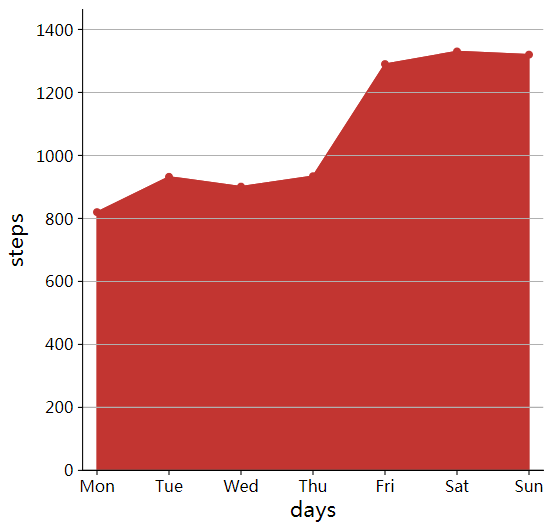
An Area Line Chart is a data visualization that combines the features of a line chart with filled areas between the data line and the axis (or another baseline). The filled region emphasizes magnitude, volume, and cumulative trends, making it effective for showing how quantities evolve over a continuous dimension (often time).
Input data instructions
Input data contains two rows: the first row is name and the second row is the corresponding values.
Paper example
Visualization of liquid-liquid phase transitions using a tiny G-quadruplex binding protein. Fig 5C
Input Example
Output

1) How to plot?
1, Put data in excel according to the example format.
2, Copy and paste into input frame.
3, Input pre-checking button to check input
4, After checking pass, select parameters, submit and download

2) How to cite?
3000+ papers in (Google Scholar)
Tang D, Chen M, Huang X, Zhang G, Zeng L, Zhang G, Wu S, Wang Y. SRplot: A free online platform for data visualization and graphing. PLoS One. 2023 Nov 9;18(11):e0294236. doi: 10.1371/journal.pone.0294236. PMID: 37943830.

3) FAQs